# Customize the Lucene search scoring
The out-of-the-box Sitefinity CMS search indexing is based on Lucene.NET. Lucene uses a combination of the [Vector Space Model (VSM)](https://en.wikipedia.org/wiki/Vector_space_model) and the [Boolean model of information Retrieval](https://en.wikipedia.org/wiki/Boolean_model_of_information_retrieval) to determine how relevant a document is to a user's query. It assigns a default score between 0 and 1 to all search results, depending on multiple factors related to document relevancy. The score is dynamically calculated between multiple searches, meaning that same document can have different scores for different searches. This is due to the Lucene score normalization algorithms.
Sitefinity CMS exposes a mechanism for influencing the Lucene search results via choosing the best algorithm to calculate search score and boosting selected documents. This article explains how you can customize the Lucene scoring in Sitefinity CMS.
## Search score theory - choosing the best boosting formula for your use case
A common use case scenario is boosting the recently modified documents to appear as more relevant search results. To demonstrate customizing the default scoring mechanism, we’ll showcase this example. When customizing the Lucene scoring mechanism in Sitefinity CMS, the Sitefinity CMS API exposes the default Lucene score and all the document info, so you can design multiple approaches to boosting the score:
### Using a multiplier function based on content age
`finalScore = defaultScore * (1/contentAge)`
A multiplier function is when you design a value which will be used to multiply the default Lucene score. To boost documents based on how recent they are, *content age* is the most suitable value to consider. Content age represents the difference between now and the time the document was last modified. One disadvantage of this approach is that the multiplier function is linear and will not work very well when *contentAge* is 0. Another possible problem might be the maximum of the multiplier function becoming too huge, thus making the default score irrelevant.
### Using a multiplier function based on content age and a constant
`finalScore = defaultScore * (1/(constant + contentAge))`
An alternative approach is adding a constant to the formula, where the constant can be any number, depending how much we want to boost the new results. For example, **2** does the job relatively well.
Adding a constant makes the boosting function still linear, but it has an improved effect on boosting recent items more aggressively than older results.
### Using an exponential boosting function with several constants
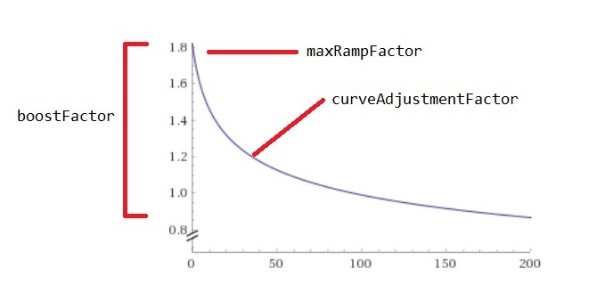
`finalScore = defaultScore * ((boostFactor / (maxRampFactor + days)) ^ (1 / curveAdjustmentFactor))`
To address the potential of the boosting function to behave too linear, you can use more than one constant to introduce variables such as *boostFactor*, *maxRampFactor* and *curveAdjustmentFactor*. For example, a function that is getting the job well done could be:
`finalScore = defaultScore * ((100 / (5 + days)) ^ (1 / 5))`
To understand better how to fine-tune these constants fit your preference, preferences, refer to the following diagram visualizing the boosting formula:
## Implementing the custom search scoring
To implement the custom Lucene scoring you need to plug in to the Sitefinity CMS `LuceneSearchService` and replace the default scoring algorithm with a custom one that inherits form the Lucene `CustomScoreQuery`class.
### Create a custom score query
To create a custom score query, you must start by adding a new class which inherits from the Lucene `CustomScoreProvider`. This provider is responsible for the search score logic. Inside the new class you must override the `CustomScore` method. This method gives you access to the Lucene document and the default score, which you can obtain by making a call to the base class method. From the document object you can extract the `LastModified` field value and use it to determine the document age in days. Now that you have access to the *content age* and *default score*, you can implement your desired custom scoring logic. For example, to implement an exponential boosting function with several constants, as described earlier in this article, you can add a method in your custom provider called `CalculateBoost`. You can call this method from the `CustomScore` method and pass the calculated content age as a parameter. Inside `CalculateBoost` you can calculate a boost value based on the additional constants you define and the content age input. Finally, you can return the calculated boost value, and use it inside the `CustomScore` method to adjust the default score (`adjustedScore = baseScore * boost`).
Once you have completed implementing the custom score provider, you must add a new class and inherit from the Lucene `CustomScoreQuery` class. Inside this class you must override the `GetCustomScoreProvider` method, which instructs Lucene which provider to use when determining the search score. In the overridden `GetCustomScoreProvider` method you must return your custom score provider. The following code sample demonstrates the full implementation:
```C#
using Lucene.Net.Documents;
using Lucene.Net.Index;
using Lucene.Net.Queries;
using Lucene.Net.Search;
using System;
using Telerik.Sitefinity.Publishing;
namespace SitefinityWebApp.Documentation.Samples.Search
{
///
/// Default Sitefinity inheritor for Lucene CustomScoreQuery
///
public class SitefinityCustomScoreQuery : CustomScoreQuery
{
///
/// Initializes a new instance of the class.
///
/// The Lucene query
/// A value indicating whether the content age should be included in the score calculation
public SitefinityCustomScoreQuery(Query subQuery, bool excludeContentAge) : base(subQuery)
{
this.excludeContentAge = excludeContentAge;
}
///
protected override CustomScoreProvider GetCustomScoreProvider(AtomicReaderContext reader)
{
return new CustomizedScoreProvider(reader, this.excludeContentAge);
}
///
/// The custom score provider for
///
protected class CustomizedScoreProvider : CustomScoreProvider
{
///
/// Initializes a new instance of the class.
///
/// The index reader
/// A value indicating whether the content age should be included in the score calculation
public CustomizedScoreProvider(AtomicReaderContext reader, bool excludeContentAge) : base(reader)
{
this.excludeAge = excludeContentAge;
}
///
public override float CustomScore(int doc, float subQueryScore, float[] valSrcScores)
{
var baseScore = base.CustomScore(doc, subQueryScore, valSrcScores);
if (this.excludeAge)
return baseScore;
double boost = 1;
var currentDocument = this.m_context.Reader.Document(doc);
var dateFieldValue = currentDocument.Get(PublishingConstants.FieldLastModified);
if (!string.IsNullOrEmpty(dateFieldValue))
{
var now = DateTime.UtcNow;
var date = DateTools.StringToDate(dateFieldValue);
var age = (int)(now - date).TotalDays;
boost = this.CalculateBoost(age);
}
var adjustedScore = baseScore * boost;
return (float)adjustedScore;
}
///
/// Calculates the boost, based on the content's age
///
/// Content's age in days
/// The boost
protected virtual double CalculateBoost(int days)
{
if (days < 0)
days = 0;
double boostFactor = 100;
double maxRampFactor = 3;
double curveAdjustmentFactor = 5;
return Math.Pow(boostFactor / (maxRampFactor + days), 1 / curveAdjustmentFactor);
}
private bool excludeAge = false;
}
private bool excludeContentAge;
}
}
```
If you want to exclude content age from score calculations, you can do so by navigating to *Administration » Settings » Advanced » Search » Search Services » LuceneSearchService*. For more information, see [Include content age in Lucene search score](https://www.progress.com/documentation/sitefinity-cms/include-content-age-in-lucene-search-score).
### Replace the default scoring algorithm in Sitefinity CMS LuceneSearchService
To configure Sitefinity CMS to use your custom score logic, you must create a custom `LuceneSearchService`, where you will return the custom score query instead of the default one.
You must start by adding a new class which inherits from the Sitefinity CMS `LuceneSearchService` class. Inside the new class, override the `BuildLuceneQuery` method. In your implementation of the `BuildLuceneQuery` method you must get an instance of the Lucene `QueryParser`, and parse the compiled query, which comes as a method argument. Then you must instantiate your custom score query class and pass the parsed query as an argument. Finally, return the object that is constructed by your custom score query class from the `BuildLuceneQuery` method. This way the parsed query will go through your custom logic and will be passed back to the Sitefinity CMS default code flow. The following sample demonstrates implementing a custom `LuceneSearchService` to achieve this functionality:
```C#
using Lucene.Net.QueryParsers.Classic;
using Lucene.Net.Search;
using System.Collections.Specialized;
using Telerik.Sitefinity.Configuration;
using Telerik.Sitefinity.Search;
using Telerik.Sitefinity.Services.Search.Configuration;
using Telerik.Sitefinity.Services.Search.Data;
namespace SitefinityWebApp
{
public class CustomizedLuceneSearchService : LuceneSearchService
{
protected override Query BuildLuceneQuery(string compiledQuery, SearchOptions searchOptions, IndexSearcher searcher = null)
{
var parser = new QueryParser(Lucene.Net.Util.LuceneVersion.LUCENE_48, string.Empty, this.GetAnalyzer());
parser.Locale = System.Globalization.CultureInfo.InvariantCulture;
if (compiledQuery.Contains("*"))
{
if (searchOptions.SearchType == SearchType.Contains)
{
parser.AllowLeadingWildcard = true;
}
parser.MultiTermRewriteMethod = WildcardQuery.SCORING_BOOLEAN_QUERY_REWRITE;
}
var query = parser.Parse(compiledQuery);
if (searcher != null)
{
query = searcher.Rewrite(query);
}
bool excludeAge;
var config = this.GetLuceneServiceConfig();
bool.TryParse(config[LuceneSearchService.ExcludeContentAgeFromScoreCalculation], out excludeAge);
return new SitefinityCustomScoreQuery(query, excludeAge);
}
private NameValueCollection GetLuceneServiceConfig()
{
var searchConfig = Config.Get();
if (searchConfig.SearchServices.TryGetValue(LuceneSearchService.ServiceName, out var luceneService))
{
var parameters = luceneService.Parameters;
return parameters;
}
else
{
return new NameValueCollection();
}
}
}
}
```
To complete the task, you must replace the default `LuceneSearchService` with your custom one. You can do this either through the Sitefinity CMS administrative backend or inside your website `Global.asax` class.
To replace the default `LuceneSearchService` with your custom one via configurations, follow these steps:
1. Navigate to your Sitefinity CMS backend UI and click on *Administration » Settings » Advanced*
2. From the navigation menu on the Advanced configurations screen expand *Search » Search Services* and click on *LuceneSearchService*
3. Change the **TypeName** to the **CLR type** of your customized *LuceneSearchService*, for example `SitefinityWebApp.CustomizedLuceneSearchService`
Alternatively, you can replace the default `LuceneSearchService` with your custom one through code via the Sitefinity CMS ServiceBus implementation. To do this, implement the following code inside your Global.asax:
```C#
using SitefinityWebApp.Documentation.Samples.Search;
using System;
using Telerik.Sitefinity.Abstractions;
using Telerik.Sitefinity.Services;
using Telerik.Sitefinity.Services.Search;
namespace SitefinityWebApp
{
public class Global : System.Web.HttpApplication
{
protected void Application_Start(object sender, EventArgs e)
{
Bootstrapper.Bootstrapped += Bootstrapper_Bootstrapped;
}
private void Bootstrapper_Bootstrapped(object sender, EventArgs e)
{
ServiceBus.UnregisterService();
ServiceBus.RegisterService(new CustomizedLuceneSearchService());
}
}
}
```
> info **NOTE**: You can use the approach described in this article to boost your content search score based on any other field, using any custom algorithm. Just choose the formula that best represent the boost significance for your specific case and modify the default boost. You can also chain multiple boosting formulas.